Designing a reporting platform to give banks merchant insights
Designing a reporting platform to give banks merchant insights
Helping banks understand where merchants succeed and where they struggle
Role
Role
User Interface Design, User Experience Design
Team
Team
Product managers, Program managers
Sales team, Developers, Founder
Tools
Tools
Notion, Figma, Slack
Duration
Duration
2 months
about the company
What is Pollinate?
Pollinate is a fintech platform serving tier 1 banks and financial institutions. It provides a suite of configurable mini apps and merchant acquiring tools that enable banks to deliver seamless financial experiences to their merchants. Beyond customer-facing solutions, Pollinate also builds internal tools like sales agent, announcements, reporting and status tracking systems to help banks manage and support their merchant networks more effectively.
about the company
What is Pollinate?
Pollinate is a fintech platform serving tier 1 banks and financial institutions. It provides a suite of configurable mini apps and merchant acquiring tools that enable banks to deliver seamless financial experiences to their merchants. Beyond customer-facing solutions, Pollinate also builds internal tools like sales agent, announcements, reporting and status tracking systems to help banks manage and support their merchant networks more effectively.
about the company
What is Pollinate?
Pollinate is a fintech platform serving tier 1 banks and financial institutions. It provides a suite of configurable mini apps and merchant acquiring tools that enable banks to deliver seamless financial experiences to their merchants. Beyond customer-facing solutions, Pollinate also builds internal tools like sales agent, announcements, reporting and status tracking systems to help banks manage and support their merchant networks more effectively.

About the problem
Overview
Banks purchasing Pollinate's merchant onboarding solution had no centralized way to monitor how merchants were progressing through the journey. Account managers, analysts, and executives each needed visibility into different aspects: conversion rates, funnel dropoff points, merchant activation timelines, and which stages were causing friction. Without this data in one place, banks couldn't identify patterns, optimize their onboarding process, or respond quickly when merchants got stuck.
About the problem
Overview
Banks purchasing Pollinate's merchant onboarding solution had no centralized way to monitor how merchants were progressing through the journey. Account managers, analysts, and executives each needed visibility into different aspects: conversion rates, funnel dropoff points, merchant activation timelines, and which stages were causing friction. Without this data in one place, banks couldn't identify patterns, optimize their onboarding process, or respond quickly when merchants got stuck.
About the problem
Overview
Banks purchasing Pollinate's merchant onboarding solution had no centralized way to monitor how merchants were progressing through the journey. Account managers, analysts, and executives each needed visibility into different aspects: conversion rates, funnel dropoff points, merchant activation timelines, and which stages were causing friction. Without this data in one place, banks couldn't identify patterns, optimize their onboarding process, or respond quickly when merchants got stuck.
The challenge
Understanding the problem
Banks needed to answer critical questions: How many merchants are starting the onboarding process? Where are they dropping off? Which stages have the highest friction? Are self-service merchants converting differently than those using assisted flows? Without answers, banks were flying blind, unable to improve their merchant experience or make data-driven decisions about their onboarding strategy. This led us to a critical question: How might we give banks complete visibility into their merchant onboarding funnel so they can identify bottlenecks, measure performance, and continuously improve the experience?
The challenge
Understanding the problem
Banks needed to answer critical questions: How many merchants are starting the onboarding process? Where are they dropping off? Which stages have the highest friction? Are self-service merchants converting differently than those using assisted flows? Without answers, banks were flying blind, unable to improve their merchant experience or make data-driven decisions about their onboarding strategy. This led us to a critical question: How might we give banks complete visibility into their merchant onboarding funnel so they can identify bottlenecks, measure performance, and continuously improve the experience?
The challenge
Understanding the problem
Banks needed to answer critical questions: How many merchants are starting the onboarding process? Where are they dropping off? Which stages have the highest friction? Are self-service merchants converting differently than those using assisted flows? Without answers, banks were flying blind, unable to improve their merchant experience or make data-driven decisions about their onboarding strategy. This led us to a critical question: How might we give banks complete visibility into their merchant onboarding funnel so they can identify bottlenecks, measure performance, and continuously improve the experience?
Lack of centralized visibility
No centralized view of merchant progression through onboarding stages.
Unknown dropout points
Banks unable to identify where merchants are dropping off.
Siloed metrics across flows
Disconnect between self-service and assisted onboarding metrics
Hidden friction points
No visibility into suspected dropout reasons (form friction, validation errors, etc.).
competitve analysis
Multiple rounds of clarification
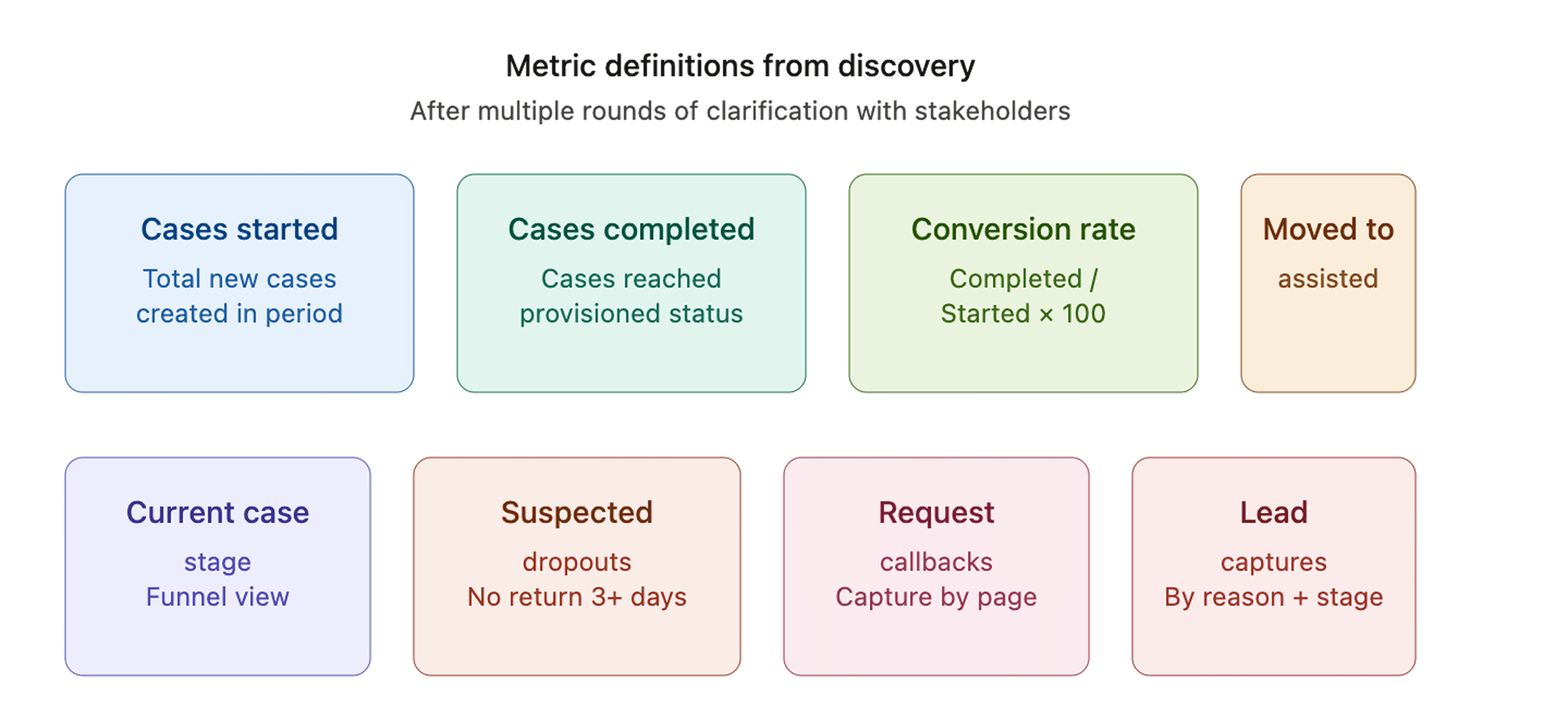
Building a reporting platform for banks required us to be precise about what each metric meant. After several rounds of meetings with stakeholders, we worked through edge cases, timing logic, and how metrics behaved across self-service versus assisted flows. What counts as a "case started"? When does a case become "completed"? How do we handle merchants who start self-service but move to assisted midway? We documented every definition, calculation logic, and filtering behavior. Each metric became a sticky note on the wall — not just the name, but the precise moment it triggers, what gets excluded, and how it changes when you toggle between time periods or flow types. This clarity became the foundation for the entire dashboard.
competitve analysis
Multiple rounds of clarification
Building a reporting platform for banks required us to be precise about what each metric meant. After several rounds of meetings with stakeholders, we worked through edge cases, timing logic, and how metrics behaved across self-service versus assisted flows. What counts as a "case started"? When does a case become "completed"? How do we handle merchants who start self-service but move to assisted midway? We documented every definition, calculation logic, and filtering behavior. Each metric became a sticky note on the wall — not just the name, but the precise moment it triggers, what gets excluded, and how it changes when you toggle between time periods or flow types. This clarity became the foundation for the entire dashboard.
competitve analysis
Multiple rounds of clarification
Building a reporting platform for banks required us to be precise about what each metric meant. After several rounds of meetings with stakeholders, we worked through edge cases, timing logic, and how metrics behaved across self-service versus assisted flows. What counts as a "case started"? When does a case become "completed"? How do we handle merchants who start self-service but move to assisted midway? We documented every definition, calculation logic, and filtering behavior. Each metric became a sticky note on the wall — not just the name, but the precise moment it triggers, what gets excluded, and how it changes when you toggle between time periods or flow types. This clarity became the foundation for the entire dashboard.
Exploring visualization approaches
Finding the right visual language
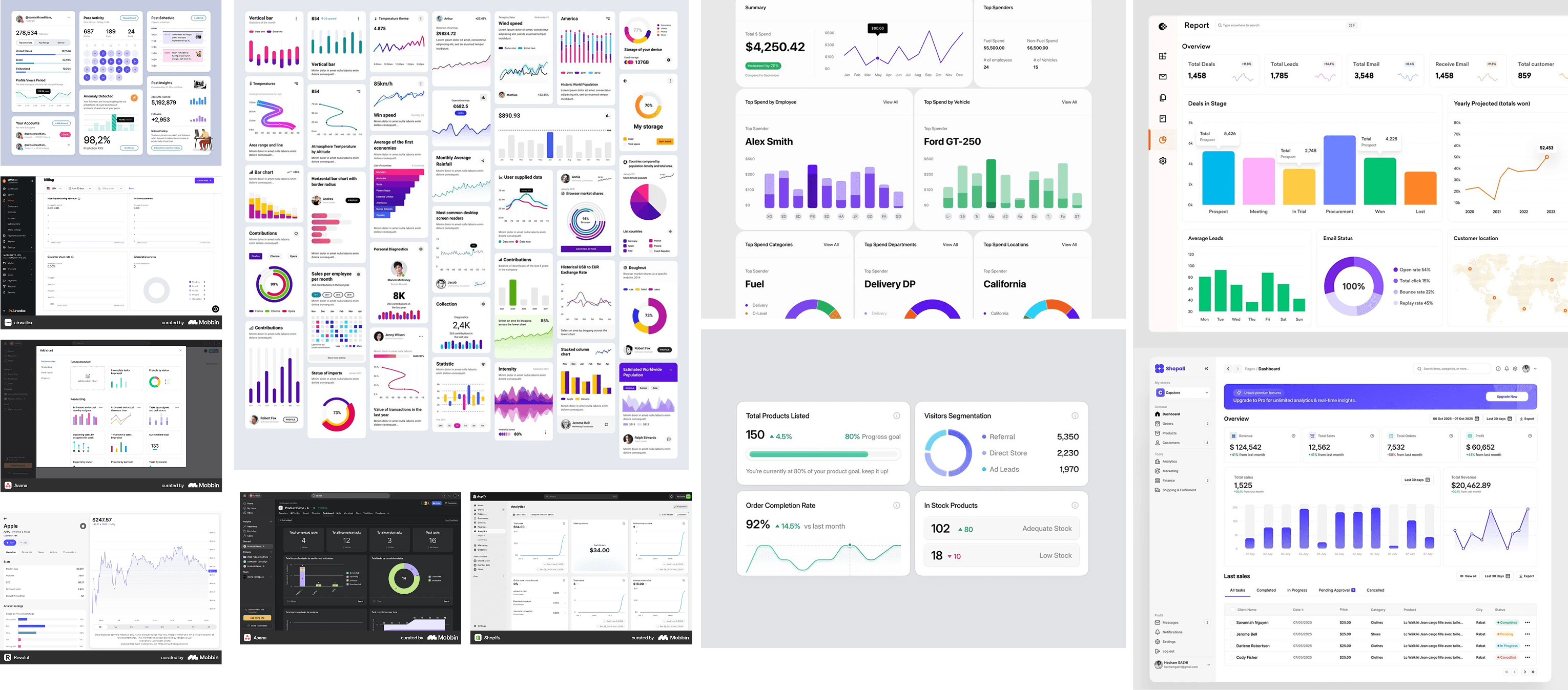
With metrics defined, the next challenge was deciding how to show them. A conversion rate could be a line chart, a gauge, a big number with trend, or a combination. Dropouts could be a donut, a bar chart, or a breakdown table. Rather than guess, I created a moodboard studying how other reporting platforms visualized similar metrics — banking dashboards, analytics platforms, ecommerce tools. For each metric, I explored multiple visual treatments to see which one communicated the insight most clearly. Headline stats got large, scannable numbers with trend indicators. Funnels became vertical bar charts showing stage progression. Dropouts became both a donut (quick snapshot) and a detailed breakdown table (for root cause analysis). The goal was consistency: users could scan the dashboard and understand the pattern immediately, then drill into detail when needed.
Exploring visualization approaches
Finding the right visual language
With metrics defined, the next challenge was deciding how to show them. A conversion rate could be a line chart, a gauge, a big number with trend, or a combination. Dropouts could be a donut, a bar chart, or a breakdown table. Rather than guess, I created a moodboard studying how other reporting platforms visualized similar metrics — banking dashboards, analytics platforms, ecommerce tools. For each metric, I explored multiple visual treatments to see which one communicated the insight most clearly. Headline stats got large, scannable numbers with trend indicators. Funnels became vertical bar charts showing stage progression. Dropouts became both a donut (quick snapshot) and a detailed breakdown table (for root cause analysis). The goal was consistency: users could scan the dashboard and understand the pattern immediately, then drill into detail when needed.
Exploring visualization approaches
Finding the right visual language
With metrics defined, the next challenge was deciding how to show them. A conversion rate could be a line chart, a gauge, a big number with trend, or a combination. Dropouts could be a donut, a bar chart, or a breakdown table. Rather than guess, I created a moodboard studying how other reporting platforms visualized similar metrics — banking dashboards, analytics platforms, ecommerce tools. For each metric, I explored multiple visual treatments to see which one communicated the insight most clearly. Headline stats got large, scannable numbers with trend indicators. Funnels became vertical bar charts showing stage progression. Dropouts became both a donut (quick snapshot) and a detailed breakdown table (for root cause analysis). The goal was consistency: users could scan the dashboard and understand the pattern immediately, then drill into detail when needed.
Designing the layout
Prioritizing what banks need to see first
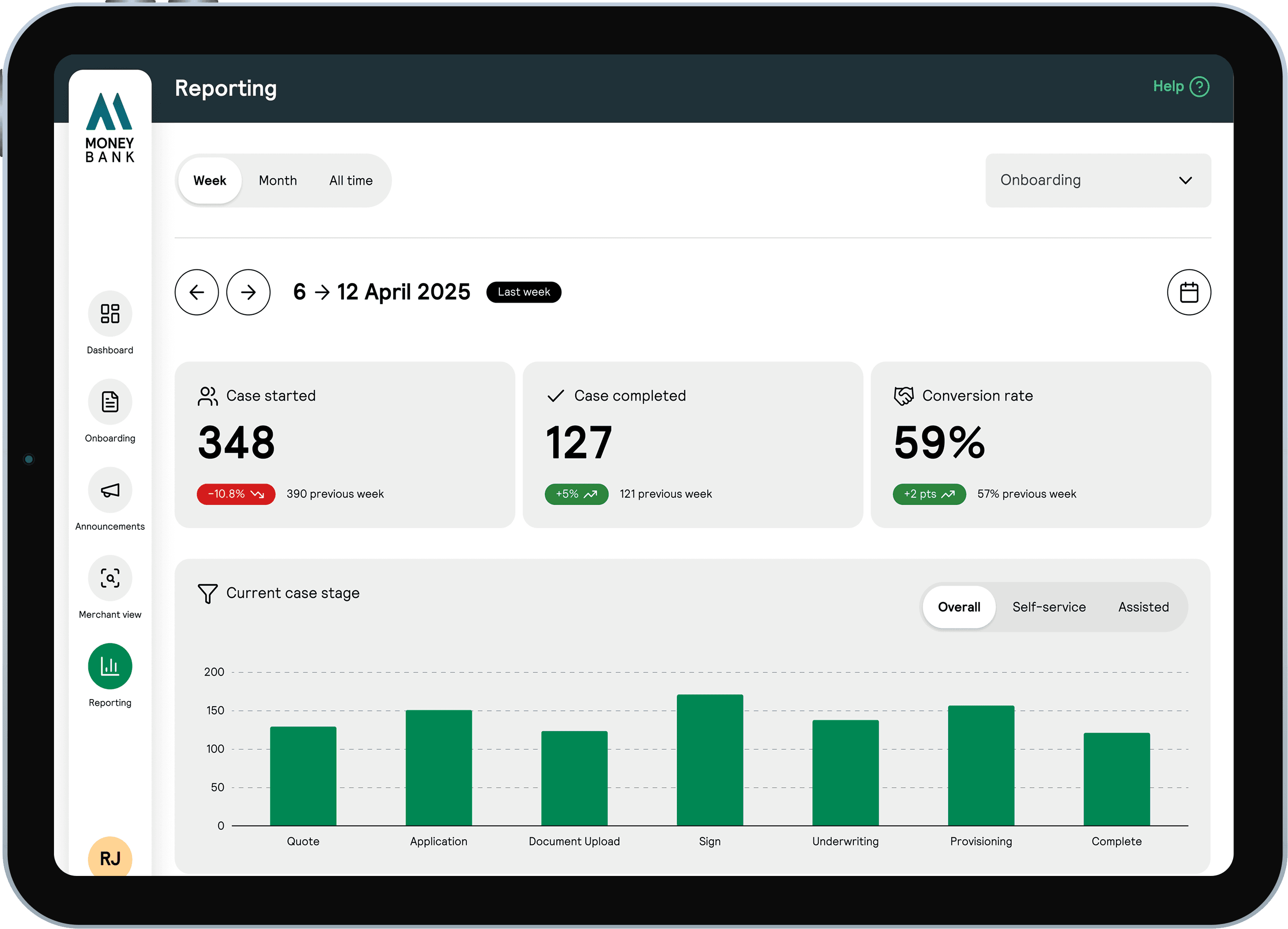
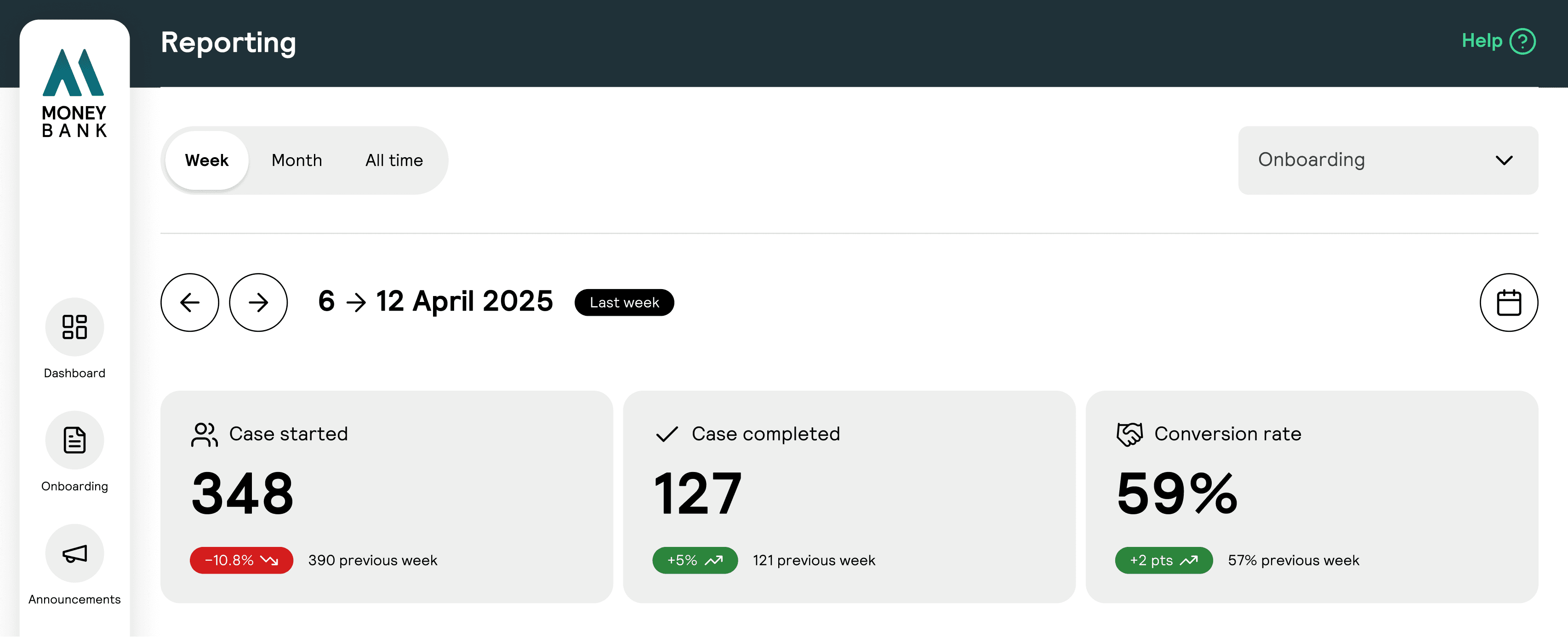
The dashboard had to answer the most critical question immediately: how are my merchants progressing right now? I kept the time filters at the top (Week, Month, All time) because every metric that follows needs to be scoped to that period. The dropdown for "Onboarding" sits beside it as a future placeholder. Banks will eventually want to see stats across all their mini apps, not just onboarding. Below that, three headline cards sit front and centre: Cases Started, Cases Completed, and Conversion Rate. These are the north star metrics. Everything else on the dashboard, the funnel, the dropouts, the callbacks, feeds into understanding these three numbers. A bank can glance at these cards and know instantly whether onboarding is improving or declining, and by how much compared to the previous period. The rest of the dashboard unfolds below, providing deeper insight without overwhelming the primary story.
Designing the layout
Prioritizing what banks need to see first
The dashboard had to answer the most critical question immediately: how are my merchants progressing right now? I kept the time filters at the top (Week, Month, All time) because every metric that follows needs to be scoped to that period. The dropdown for "Onboarding" sits beside it as a future placeholder. Banks will eventually want to see stats across all their mini apps, not just onboarding. Below that, three headline cards sit front and centre: Cases Started, Cases Completed, and Conversion Rate. These are the north star metrics. Everything else on the dashboard, the funnel, the dropouts, the callbacks, feeds into understanding these three numbers. A bank can glance at these cards and know instantly whether onboarding is improving or declining, and by how much compared to the previous period. The rest of the dashboard unfolds below, providing deeper insight without overwhelming the primary story.
Designing the layout
Prioritizing what banks need to see first
The dashboard had to answer the most critical question immediately: how are my merchants progressing right now? I kept the time filters at the top (Week, Month, All time) because every metric that follows needs to be scoped to that period. The dropdown for "Onboarding" sits beside it as a future placeholder. Banks will eventually want to see stats across all their mini apps, not just onboarding. Below that, three headline cards sit front and centre: Cases Started, Cases Completed, and Conversion Rate. These are the north star metrics. Everything else on the dashboard, the funnel, the dropouts, the callbacks, feeds into understanding these three numbers. A bank can glance at these cards and know instantly whether onboarding is improving or declining, and by how much compared to the previous period. The rest of the dashboard unfolds below, providing deeper insight without overwhelming the primary story.
Designing the layout
The funnel design
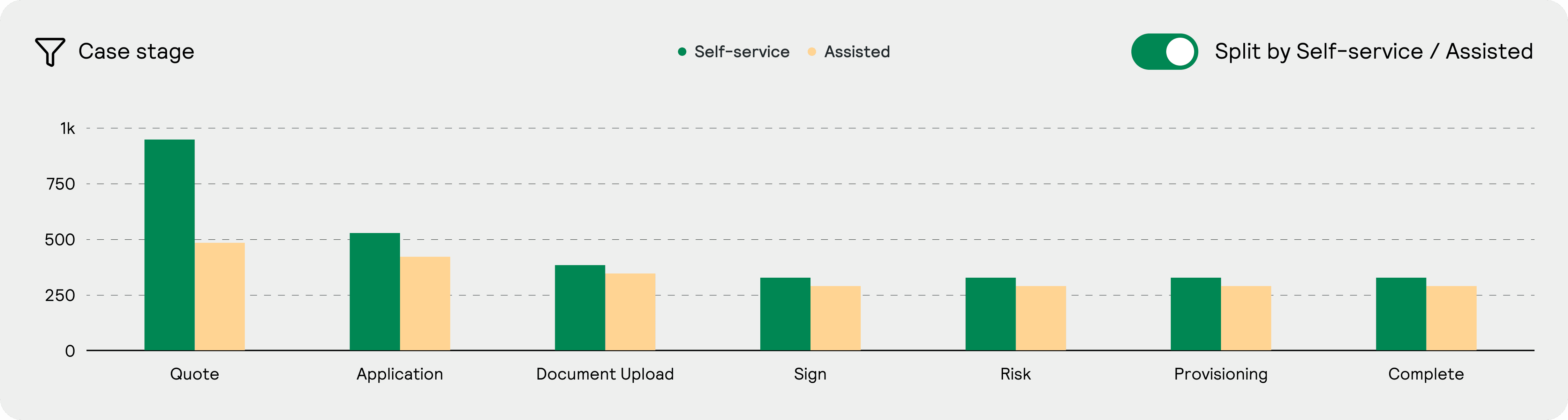
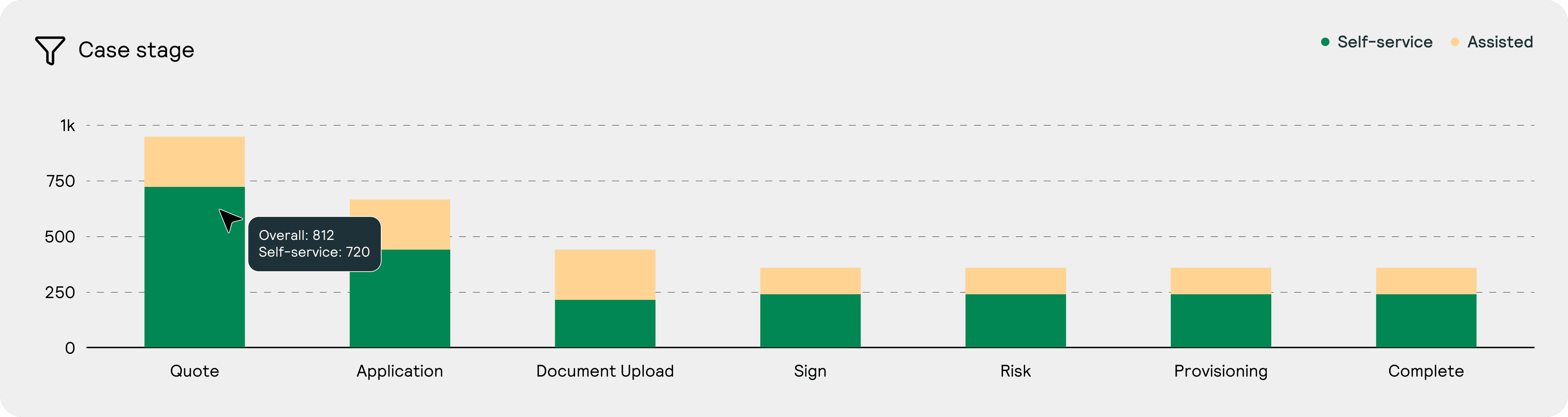
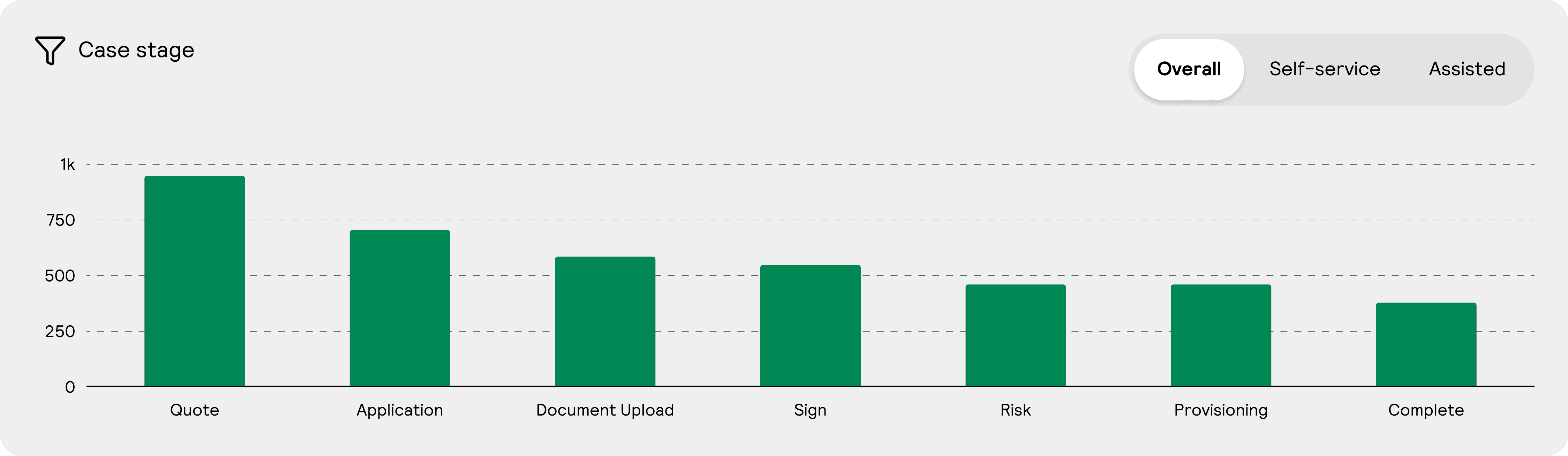
The funnel was the centerpiece of the dashboard. It needed to show where merchants were at each stage of the onboarding journey, but with a twist: banks needed to see both self-service and assisted flows simultaneously to understand how they performed relative to each other. I explored three approaches. First, a toggle switch that let users flip between self-service and assisted, but this forced a choice and hid one view. Second, a tooltip that appeared on hover to show the breakdown, but this buried the data. Third, tabs at the top of the chart that let users switch between Overall, Self-service, and Assisted views while keeping the funnel structure clear. We chose the tab version. It gave banks the ability to compare flows at a glance, switch instantly between views without losing context, and see which stages had the biggest gap between self-service and assisted. The tabs felt like a natural extension of the filtering controls at the top of the dashboard.
Designing the layout
The funnel design
The funnel was the centerpiece of the dashboard. It needed to show where merchants were at each stage of the onboarding journey, but with a twist: banks needed to see both self-service and assisted flows simultaneously to understand how they performed relative to each other. I explored three approaches. First, a toggle switch that let users flip between self-service and assisted, but this forced a choice and hid one view. Second, a tooltip that appeared on hover to show the breakdown, but this buried the data. Third, tabs at the top of the chart that let users switch between Overall, Self-service, and Assisted views while keeping the funnel structure clear. We chose the tab version. It gave banks the ability to compare flows at a glance, switch instantly between views without losing context, and see which stages had the biggest gap between self-service and assisted. The tabs felt like a natural extension of the filtering controls at the top of the dashboard.
Designing the layout
Suspected dropouts
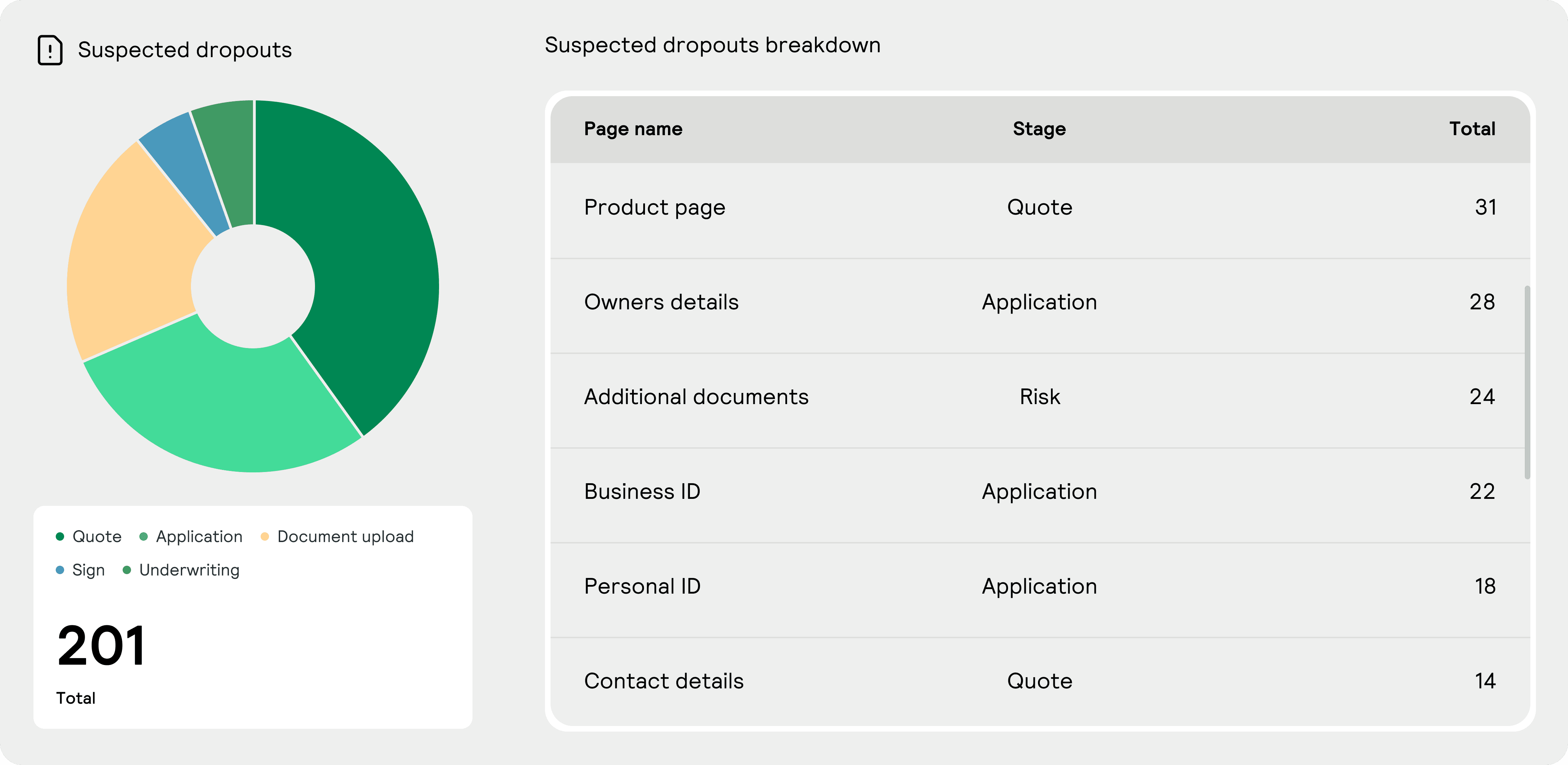
Self-service merchants need support too, but they're harder to help because banks can't see when they're stuck. We added a "Suspected dropouts" section that surfaces merchants who started onboarding but haven't returned in 3 days. This threshold is configurable, so banks can adjust based on their own expectations. The visualization pairs a donut chart showing the volume of dropouts by stage with a detailed breakdown table. In the table each row shows the exact page where merchants abandoned, the stage they were in, and the count. This lets banks prioritise: if 31 merchants dropped out on the Product page in Quote, that's a design or clarity problem worth fixing immediately.
Designing the layout
Suspected dropouts
Self-service merchants need support too, but they're harder to help because banks can't see when they're stuck. We added a "Suspected dropouts" section that surfaces merchants who started onboarding but haven't returned in 3 days. This threshold is configurable, so banks can adjust based on their own expectations. The visualization pairs a donut chart showing the volume of dropouts by stage with a detailed breakdown table. In the table each row shows the exact page where merchants abandoned, the stage they were in, and the count. This lets banks prioritise: if 31 merchants dropped out on the Product page in Quote, that's a design or clarity problem worth fixing immediately.
Designing the dashboard layout
Request callbacks and lead captures
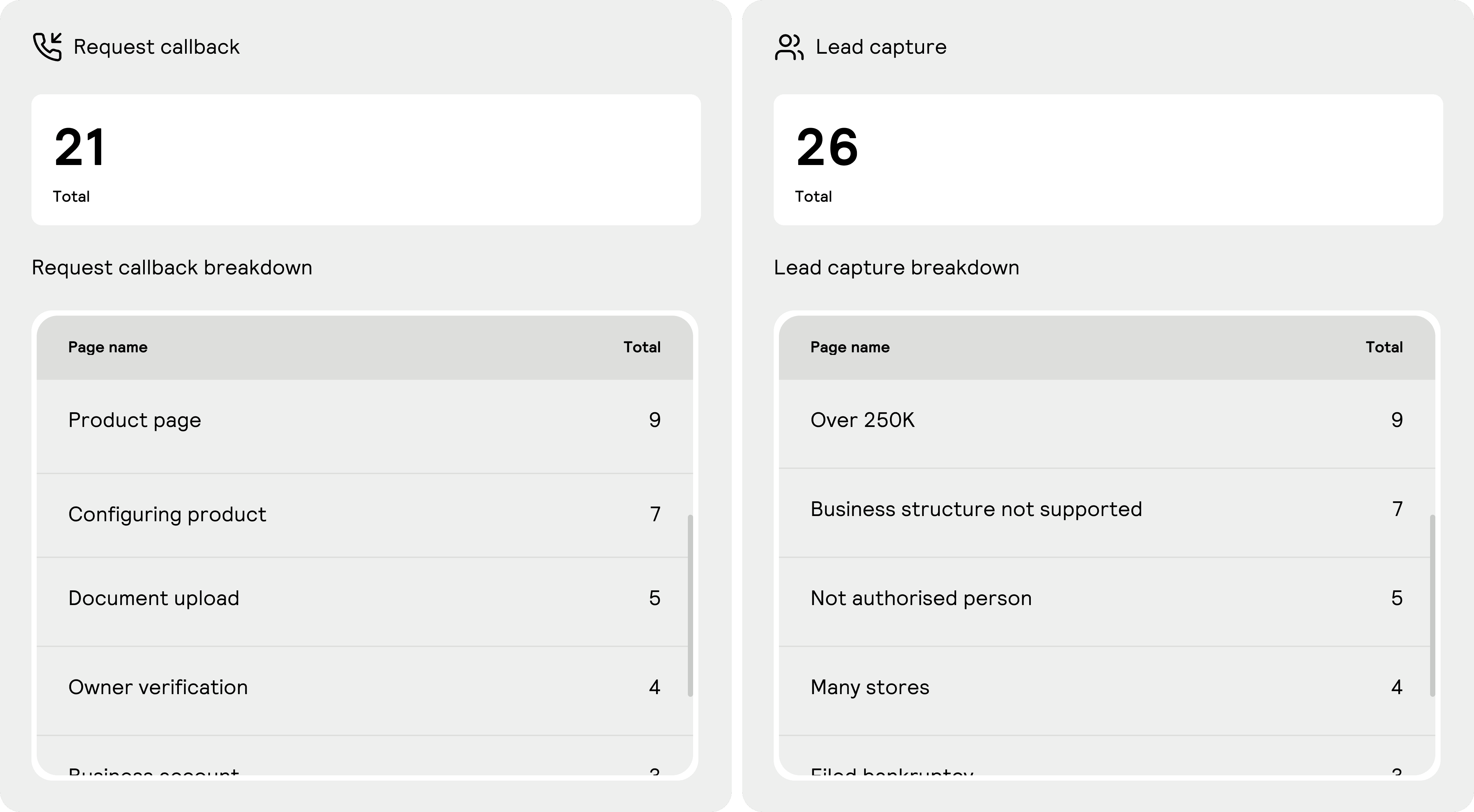
Request callbacks show when merchants ask for help. A high count on "Product page" (40 requests) means merchants are confused about product selection and need guidance. "Configuring product" (19), "Document upload" (15), "Owner verification" (14) all signal friction points where banks should improve clarity or add more guidance. Lead captures are different. These are merchants the bank intentionally moves to assisted onboarding because they represent higher opportunity or higher risk. A merchant with over 250K in revenue, multiple store locations, or a complex business structure needs white-glove attention. Lead captures show why banks are investing support effort: the reasons they shifted merchants to assisted (Over 250K revenue, Business structure not supported, Many stores, Filed bankruptcy) and how many in each category. This helps banks track where their support effort is concentrated and whether it's paying off in higher conversion. Both sections sit at the bottom of the dashboard because they're actionable signals, not headline metrics. A bank can use them to identify improvement opportunities and validate that support resources are going where they're needed most.
Designing the dashboard layout
Request callbacks and lead captures
Request callbacks show when merchants ask for help. A high count on "Product page" (40 requests) means merchants are confused about product selection and need guidance. "Configuring product" (19), "Document upload" (15), "Owner verification" (14) all signal friction points where banks should improve clarity or add more guidance. Lead captures are different. These are merchants the bank intentionally moves to assisted onboarding because they represent higher opportunity or higher risk. A merchant with over 250K in revenue, multiple store locations, or a complex business structure needs white-glove attention. Lead captures show why banks are investing support effort: the reasons they shifted merchants to assisted (Over 250K revenue, Business structure not supported, Many stores, Filed bankruptcy) and how many in each category. This helps banks track where their support effort is concentrated and whether it's paying off in higher conversion. Both sections sit at the bottom of the dashboard because they're actionable signals, not headline metrics. A bank can use them to identify improvement opportunities and validate that support resources are going where they're needed most.
Making it portable
A reusable widget for reporting insights
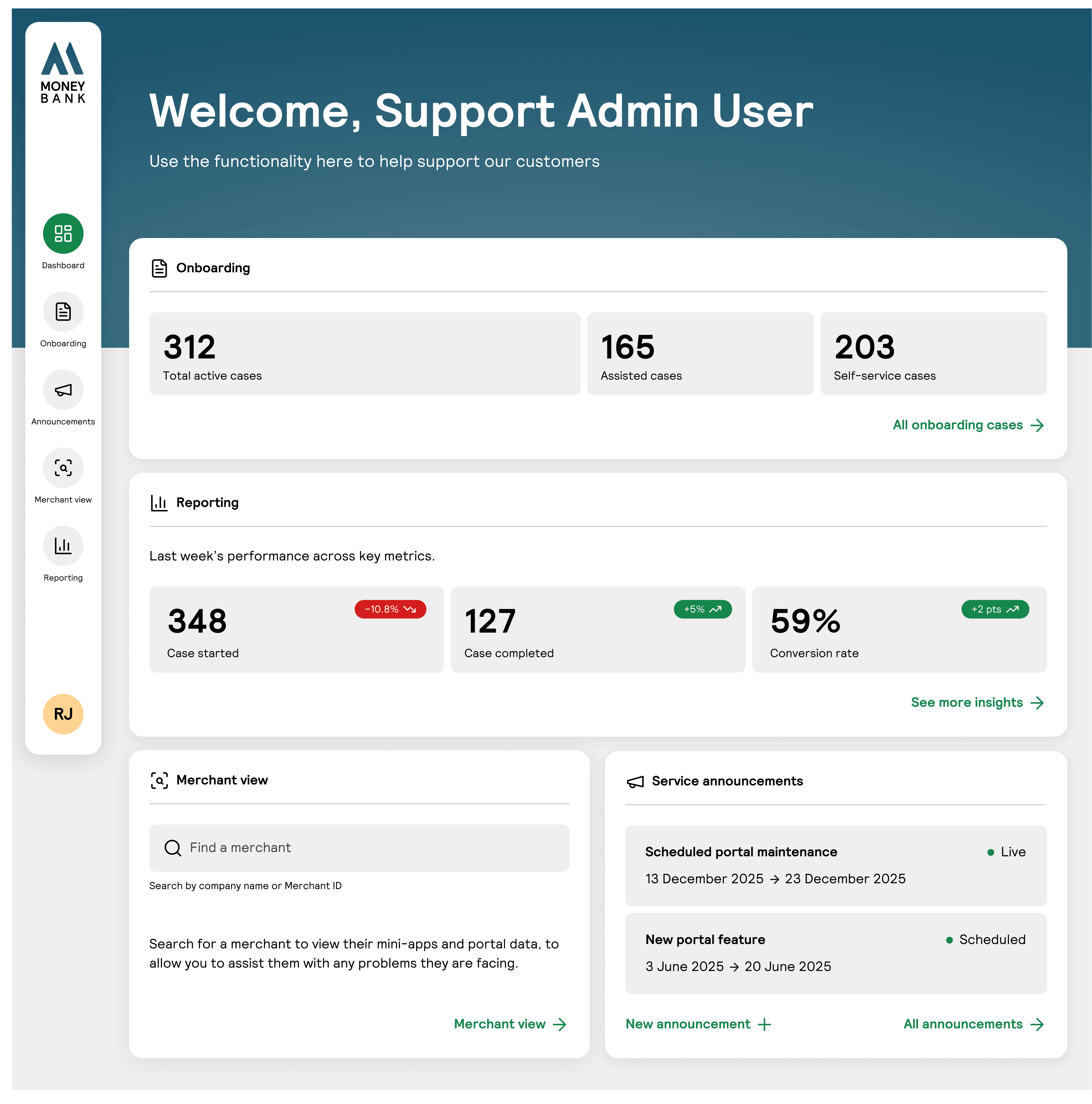
Beyond the full dashboard, we created a widget version that surfaces the key metrics in a compact card. Banks can embed this on their support dashboard or sales agent portal to see onboarding performance at a glance without navigating to the full reporting interface. We kept the design intentionally generic so it could scale to other reporting contexts. Banks might want the same widget format on their sales agent dashboard showing pipeline metrics, or on a merchant view dashboard showing individual merchant progress. The pattern works anywhere you need to surface high-level numbers with the option to drill deeper.
Making it portable
A reusable widget for reporting insights
Beyond the full dashboard, we created a widget version that surfaces the key metrics in a compact card. Banks can embed this on their support dashboard or sales agent portal to see onboarding performance at a glance without navigating to the full reporting interface. We kept the design intentionally generic so it could scale to other reporting contexts. Banks might want the same widget format on their sales agent dashboard showing pipeline metrics, or on a merchant view dashboard showing individual merchant progress. The pattern works anywhere you need to surface high-level numbers with the option to drill deeper.
Impact
Here is what we achieved
Impact
Here is what we achieved
Reduced support enquiries by up to 40% as banks proactively addressed friction before merchants reached out
Reduced time to identify dropout friction points from weeks to hours, improving response time by ~70%
Created a reusable widget pattern that scales to other reporting contexts across the platform
Increased business revenue
Created a reusable widget pattern that scales to other reporting contexts across the platform